Serverless Streaming Analytics with S3 Tables & Firehose

Introduction
Modern businesses need to analyze streaming data in real-time to make faster decisions. Whether it's monitoring IoT sensors, tracking user behavior, or processing financial transactions, the ability to query fresh data immediately is critical. However, building a streaming analytics pipeline traditionally requires managing complex infrastructure and dealing with data format conversions.
This solution shows how to build a serverless real-time streaming analytics pipeline using Amazon S3 Tables and Amazon Kinesis Data Firehose. By combining streaming ingestion with Apache Iceberg's analytics-optimized format, you can query data within minutes of generation—without managing any servers or data transformation jobs.
GitHub Repository: https://github.com/manu-mishra/s3table-firehose-lambda-terraform-demo
Architecture Overview
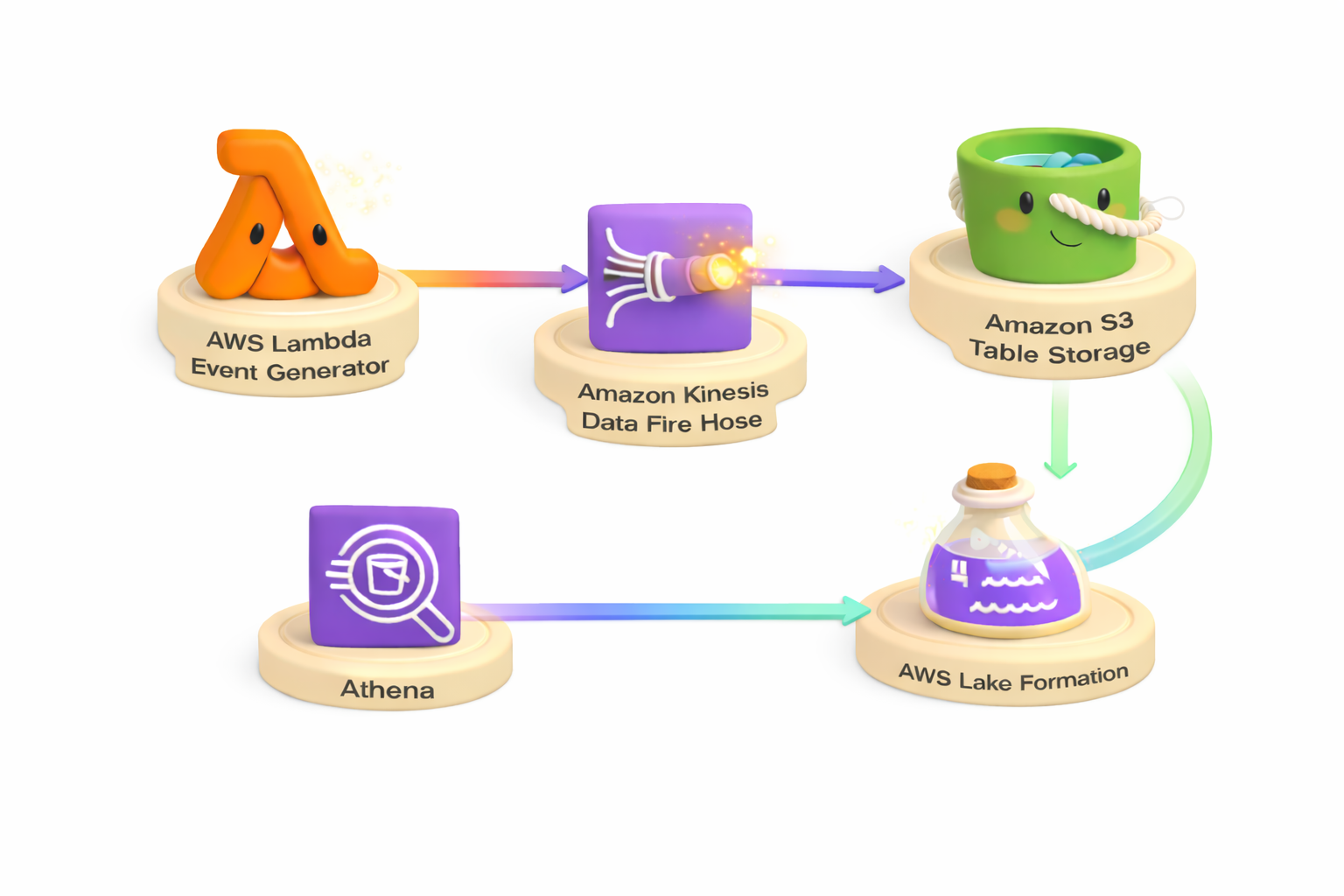
The solution creates an end-to-end streaming analytics pipeline that generates IoT sensor data using AWS Lambda, simulating 10 sensors across multiple locations. Data streams continuously through Amazon Kinesis Data Firehose with automatic buffering and delivery, then gets stored in Apache Iceberg format using Amazon S3 Tables for optimized analytics performance. The solution integrates with AWS Lake Formation for centralized data governance and access control.
The solution generates approximately 600,000 records per hour from simulated IoT sensors, demonstrating real-world streaming data patterns for temperature, humidity, and pressure monitoring across warehouse and office locations.
Key Components
Data Generation Layer
AWS Lambda (512 MB memory) generates 10,000 IoT sensor records per invocation at a rate of 200 records per second. The function is triggered every minute by Amazon EventBridge, producing consistent data flow for the pipeline. An AWS Identity and Access Management (IAM) role grants the Lambda function permissions to write to Firehose and Amazon CloudWatch Logs.
Streaming Layer
Amazon Kinesis Data Firehose buffers incoming data for up to 5 minutes or 5 MB before writing to the destination. An IAM role provides Firehose with permissions to access S3 Tables via Lake Formation, write to the error bucket, and use AWS Key Management Service (AWS KMS) for encryption.
Storage Layer
Amazon S3 Tables stores data in Apache Iceberg format with automatic schema management and table optimization. The table bucket is encrypted using AWS KMS customer-managed keys.
Amazon Simple Storage Service (Amazon S3) Error Bucket captures failed deliveries from Firehose when records cannot be written to S3 Tables. The error bucket is encrypted with AWS KMS customer-managed keys and has versioning enabled for audit trails. Failed records are written to the errors/ prefix with metadata about the failure reason, enabling troubleshooting and data recovery.
Governance Layer
AWS Lake Formation grants explicit permissions (ALL, ALTER, DELETE, DESCRIBE, DROP, INSERT, SELECT) to the Firehose role for database, table, and column access, ensuring secure and governed data access patterns.
Monitoring Layer
Amazon CloudWatch Dashboard provides real-time monitoring of Firehose metrics, Lambda performance, and S3 Tables storage with 9 pre-configured widgets tracking key operational metrics.
Data Schema
The solution generates IoT sensor data with the following schema:
- sensor_id (string): Unique identifier for each sensor
- timestamp (long): Unix timestamp in seconds
- location (string): Physical location of the sensor
- temperature (double): Temperature reading in Celsius
- humidity (double): Humidity percentage
- pressure (double): Atmospheric pressure in hPa
Data generation rate: 200 records per second during Lambda execution, producing approximately 10,000 records per invocation and 600,000 records per hour across all sensors.
Prerequisites
One-Time Account Configuration
-
Enable S3 Tables Integration with Lake Formation
- Navigate to the Amazon S3 console
- Select Table buckets in the left navigation
- Click Enable integration
- This registers S3 Tables with AWS Lake Formation
-
Configure Lake Formation Administrator Permissions
- The IAM identity running Terraform requires Lake Formation administrator permissions
- Navigate to the AWS Lake Formation console
- Select Administrative roles and tasks → Choose administrators
- Add your IAM user or role
Alternatively, use the AWS CLI:
aws lakeformation put-data-lake-settings \
  --data-lake-settings '{"DataLakeAdmins":[{"DataLakePrincipalIdentifier":"arn:aws:iam::ACCOUNT:user/YOUR_USER"}]}'
Required Tools
- Terraform >= 1.0
- AWS Command Line Interface (AWS CLI) >= 2.15 (for S3 Tables support)
- AWS credentials configured
- Terraform AWS Provider >= 6.0 (for S3 Tables schema support)
Validation Script
The solution includes a validation script to verify all prerequisites before deployment:
./validate-prerequisites.sh
This script checks:
- AWS credentials configuration
- S3 Tables integration with Lake Formation is enabled
- Current IAM identity is a Lake Formation administrator
- Required IAM permissions are available
- AWS CLI version supports S3 Tables (v2.15+)
- Terraform is installed (v1.0+)
Deployment
Infrastructure as Code
The solution uses Terraform to provision all AWS resources. The deployment creates:
- S3 Tables table bucket, namespace, and Iceberg table with schema (KMS encrypted)
- Kinesis Data Firehose delivery stream with Iceberg destination
- Amazon S3 error bucket for failed deliveries (KMS encrypted)
- AWS Lambda data generator function (512 MB, triggered every minute)
- Amazon EventBridge schedule rule
- IAM roles and policies for Firehose and Lambda
- AWS KMS customer-managed encryption key
- Amazon CloudWatch dashboard with 9 monitoring widgets
- AWS Lake Formation permissions (automated via Terraform)
Deployment Steps
-
Configure
terraform.tfvarswith your stack name (must be globally unique):stack_name = "your-unique-stack-name" -
Deploy the infrastructure:
terraform init
terraform apply
All resources are created with Lake Formation permissions automatically granted during deployment.
Verification
Lambda begins sending data immediately. Wait 5-6 minutes for Firehose buffering, then verify data flow using the Amazon CloudWatch dashboard. The dashboard provides real-time visibility into:
- Firehose incoming records and delivery metrics
- Lambda invocations and performance
- S3 Tables storage growth
Access the dashboard URL from Terraform outputs:
terraform output dashboard_url
Alternatively, check for delivery errors:
aws s3 ls s3://{stack_name}-errors/errors/ --recursive
An empty result indicates successful data delivery.
Querying Data
After deployment, query the streaming data stored in S3 Tables using Apache Iceberg-compatible query engines:
View All Sensor Data
SELECT * FROM firehosetos3demo.firehosetos3demo LIMIT 100;
Average Temperature by Location
SELECT
    location,
    AVG(temperature) as avg_temp,
    COUNT(*) as reading_count
FROM firehosetos3demo.firehosetos3demo
GROUP BY location
ORDER BY avg_temp DESC;
Recent High Temperature Alerts
SELECT
    sensor_id,
    temperature,
    humidity,
    timestamp,
    from_unixtime(timestamp) as reading_time
FROM firehosetos3demo.firehosetos3demo
WHERE temperature > 25
ORDER BY timestamp DESC
LIMIT 50;
Sensor Activity Summary
SELECT
    sensor_id,
    location,
    COUNT(*) as total_readings,
    AVG(temperature) as avg_temp,
    AVG(humidity) as avg_humidity,
    MIN(timestamp) as first_reading,
    MAX(timestamp) as last_reading
FROM firehosetos3demo.firehosetos3demo
GROUP BY sensor_id, location
ORDER BY sensor_id;
Monitoring and Operations
CloudWatch Dashboard
The solution includes a pre-configured Amazon CloudWatch dashboard with the following metrics:
Firehose Metrics:
- Incoming records
- Delivery success/failure counts
- Data freshness (time from arrival to delivery)
- Bytes delivered
Lambda Metrics:
- Invocations
- Errors
- Duration
S3 Tables Metrics:
- Storage size
- File count
Access the dashboard URL from Terraform outputs:
terraform output dashboard_url
Error Monitoring
Check for delivery failures:
aws s3 ls s3://{stack_name}-errors/errors/iceberg-failed/ --recursive
Security Considerations
Encryption
- At Rest: All data in S3 Tables and the error bucket is encrypted using AWS KMS customer-managed keys with automatic key rotation enabled
- In Transit: All data transfers use TLS encryption
Access Control
- IAM Roles: Least-privilege IAM policies for Lambda and Firehose
- Lake Formation: Fine-grained access control at database, table, and column levels
- KMS Key Policies: Explicit permissions for service principals and roles
Cost Optimization
The solution implements several cost optimization strategies:
- Firehose Buffering: 5-minute or 5 MB buffering reduces the number of small files written to S3 Tables
- CloudWatch Logs Retention: 1-day retention for Lambda logs reduces storage costs
- S3 Tables Maintenance: Automatic compaction and optimization reduce storage costs over time
Technical Implementation Notes
Schema Definition
Amazon Kinesis Data Firehose requires S3 Tables to have a pre-defined schema. The solution uses Terraform AWS Provider 6.0+ which supports schema definition via the metadata block:
metadata {
  iceberg {
    schema {
      field {
        name     = "sensor_id"
        type     = "string"
        required = false
      }
      # Additional fields...
    }
  }
}
Lake Formation Permissions
The solution uses Terraform's null_resource with local-exec provisioner to automatically grant Lake Formation permissions using the AWS CLI during deployment. This approach is necessary because Terraform's aws_lakeformation_permissions resource does not support S3 Tables catalog ARNs (format: account:s3tablescatalog/bucket-name).
The null_resource executes after the foundational resources (S3 Tables, IAM roles) are created but before the Firehose delivery stream is provisioned. This ensures the Firehose role has the required Lake Formation permissions (ALL, ALTER, DELETE, DESCRIBE, DROP, INSERT, SELECT) for database, table, and column access before attempting to write data.
Without these permissions, Firehose would fail with Lakeformation.AccessDenied errors when attempting to write to S3 Tables. The automated approach eliminates manual permission configuration and ensures consistent deployments.
Firehose Buffering
Amazon Kinesis Data Firehose buffers data for up to 5 minutes (300 seconds) or 5 MB before writing to S3 Tables. This buffering mechanism optimizes write performance and reduces the number of small files, which improves query performance and reduces costs.
Cleanup
To remove all resources:
terraform destroy
Note: The AWS KMS key will be scheduled for deletion with a 7-day waiting period (AWS minimum).
Conclusion
This solution demonstrates a production-ready pattern for streaming data ingestion into Amazon S3 Tables using Amazon Kinesis Data Firehose. The architecture provides automatic buffering, schema management, encryption, governance, and monitoring capabilities suitable for real-world analytics workloads. The use of Apache Iceberg format through S3 Tables enables efficient querying, ACID transactions, and time travel capabilities for your streaming data.
By combining serverless compute (Lambda), managed streaming (Firehose), and analytics-optimized storage (S3 Tables), you can build scalable real-time analytics pipelines without managing infrastructure. The solution processes 600,000 records per hour with sub-minute query latency, demonstrating the power of modern serverless data architectures on AWS.