Universal Image MCP - One Server, Three AI Image Providers

I use AI-generated images constantly—architecture diagrams, UI mockups, interface concepts, responsive design visualizations. Different models excel at different tasks, and I often compare outputs across providers to pick the best result.
The existing MCP servers I found had a common limitation: hardcoded model IDs. When providers deprecated models, tools broke. When new models launched, they weren't available until someone updated the code.
So I built Universal Image MCP—a server that fetches models dynamically from provider APIs. New models appear automatically. Deprecated ones disappear. No code changes required.
The Problem with Multi-Provider Image Generation
Each provider requires separate integration work:
# AWS Bedrock
import boto3
bedrock = boto3.client('bedrock-runtime', region_name='us-east-1')
response = bedrock.invoke_model(...)

# OpenAI
from openai import OpenAI
client = OpenAI(api_key="...")
response = client.images.generate(...)

# Google Gemini
import google.generativeai as genai
genai.configure(api_key="...")
response = model.generate_content(...)
Each has different authentication, request formats, response structures, and error handling. Building applications that switch between providers means maintaining three parallel code paths.
MCP as the Abstraction Layer
The Model Context Protocol provides a standardized way for AI assistants to interact with external tools. Instead of building provider-specific integrations into your application, you build one MCP server that handles the complexity.
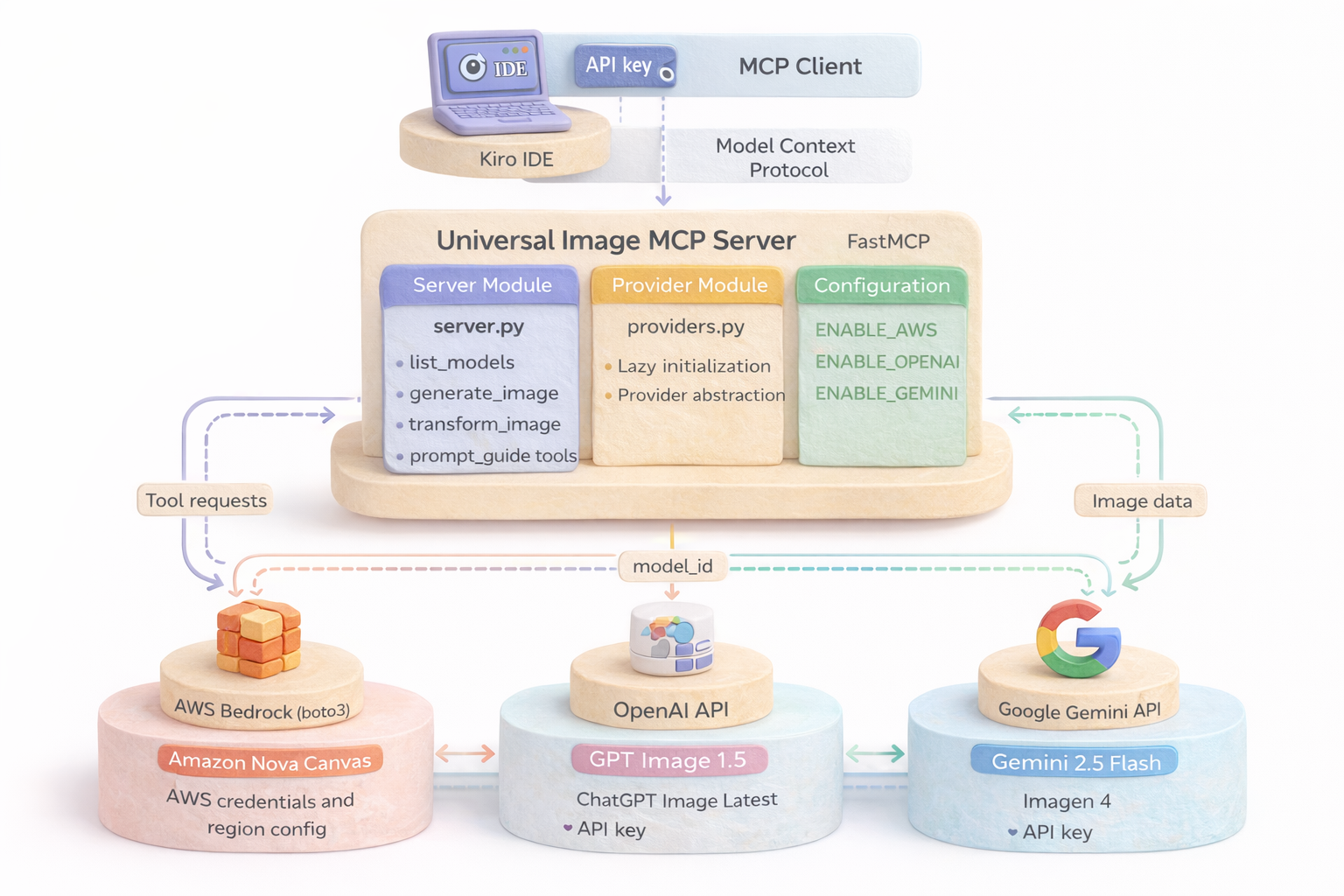
Universal Image MCP exposes four tools:
list_models()- Discover available models across all enabled providersgenerate_image()- Create images from text promptstransform_image()- Edit existing images with AIprompt_guide()- Get prompt engineering best practices
Behind these tools, the server handles provider routing, credential management, and API translation.
Architecture Decisions
Lazy Initialization
Provider clients initialize only when first used. If you enable all three providers but only use OpenAI, AWS and Google clients never instantiate:
class ProviderManager:
    def __init__(self):
        self._aws_client = None
        self._openai_client = None
        self._gemini_client = None

    @property
    def aws(self):
        if self._aws_client is None and os.getenv('ENABLE_AWS') == 'true':
            self._aws_client = AWSBedrockProvider()
        return self._aws_client
This reduces cold start time and avoids credential validation for unused providers.
Dynamic Model Discovery
Models are fetched from provider APIs at runtime, not hardcoded. When you call list_models(), the server queries each enabled provider's API for current model availability:
# AWS Bedrock
models = bedrock.list_foundation_models(
    byOutputModality='IMAGE',
    byInferenceType='ON_DEMAND'
)

# OpenAI
models = openai.models.list()
filtered = [m for m in models if 'image' in m.id.lower()]

# Google Gemini
models = genai.list_models()
filtered = [m for m in models if 'generateContent' in m.supported_generation_methods]
This ensures you always see the latest models without updating the server code.
Provider Abstraction
Each provider implements a common interface:
class ImageProvider(ABC):
    @abstractmethod
    def list_models(self) -> List[str]:
        pass

    @abstractmethod
    def generate_image(self, prompt: str, model_id: str, **kwargs) -> bytes:
        pass

    @abstractmethod
    def transform_image(self, image_path: str, prompt: str, model_id: str, **kwargs) -> bytes:
        pass
The server routes requests based on model ID prefix:
def route_request(model_id: str):
    if model_id.startswith('amazon.'):
        return providers.aws
    elif model_id.startswith('gpt-') or model_id.startswith('chatgpt-'):
        return providers.openai
    elif model_id.startswith('models/'):
        return providers.gemini
Installation and Configuration
Install via pip:
pip install universal-image-mcp
Configure in Kiro IDE (~/.kiro/settings/mcp.json):
{
  "mcpServers": {
    "universal-image-mcp": {
      "command": "uvx",
      "args": ["universal-image-mcp@latest"],
      "env": {
        "ENABLE_AWS": "true",
        "AWS_PROFILE": "default",
        "AWS_REGION": "us-east-1",

        "ENABLE_OPENAI": "true",
        "OPENAI_API_KEY": "sk-...",

        "ENABLE_GEMINI": "true",
        "GEMINI_API_KEY": "..."
      }
    }
  }
}
Restart Kiro IDE. The server appears in the MCP tools menu.
Production Considerations
Credential Management
The server reads credentials from environment variables. For production deployments:
- AWS: Use IAM roles instead of access keys
- OpenAI: Rotate API keys regularly, use separate keys per environment
- Google: Use service accounts for programmatic access
Cost Control
Each provider bills differently:
- AWS Bedrock: Per-image pricing, volume discounts available
- OpenAI: Per-image pricing, varies by model and resolution
- Google Gemini: Per-image pricing, free tier available
Monitor usage through provider dashboards. The MCP server doesn't add usage tracking—implement that in your application layer if needed.
Error Handling
The server returns provider errors to the client. Common failures:
- Authentication errors: Invalid or expired credentials
- Rate limits: Too many requests in short time window
- Model unavailable: Requested model not accessible in your region/account
- Invalid parameters: Unsupported image dimensions or formats
Your AI assistant displays these errors in the chat. For programmatic use, parse the error response and implement retry logic.
When to Use This Pattern
Universal Image MCP works well when:
- You need flexibility to switch providers based on use case
- You're building AI applications that generate images
- You want to compare provider outputs without managing multiple integrations
- You're using Claude Desktop or other MCP-compatible clients
It's less useful when:
- You only need one provider (use their SDK directly)
- You need fine-grained control over provider-specific features
- You're building high-throughput batch processing (MCP adds overhead)
What's Next
The MCP ecosystem is evolving rapidly. Future enhancements could include:
- Streaming support for progressive image generation
- Batch operations for generating multiple images in one call
- Cost estimation before generating images
- Additional providers (Stability AI, Midjourney API when available)
The code is open source at github.com/manu-mishra/universal-image-mcp. Contributions welcome.
Conclusion
Multi-provider AI image generation doesn't require managing three separate integrations. By building an MCP server that abstracts provider differences, you get a single interface that works across AWS Bedrock, OpenAI, and Google Gemini.
The Model Context Protocol provides the standardization layer. Your application—whether it's Claude Desktop, a custom MCP client, or an AI agent—interacts with one set of tools. The server handles routing, authentication, and API translation.
If you're building AI applications that need image generation flexibility, this pattern is worth considering. One server, three providers, zero integration headaches.
Resources: